Algorithms
| Algorithm | Accuracy | Speed | Burst handling | Complexity | Use case |
|---|---|---|---|---|---|
sliding_window (default) |
High | Fast | Smooth | Medium | General APIs |
fixed_window |
Medium | Fastest | 2× at boundary | Low | High-throughput coarse limits |
token_bucket |
High | Fast | Absorbs bursts | Medium | Bursty traffic |
leaky_bucket |
High | Fast | Flattens bursts | Medium | Traffic shaping |
Diagrams source: GeeksForGeeks — Rate Limiting Algorithms
Choosing an algorithm
Traffic pattern
The most important factor. Ask: is your traffic steady or bursty?
| Traffic type | Recommended |
|---|---|
| Steady, predictable flow | fixed_window or sliding_window |
| Occasional bursts that should be absorbed | token_bucket |
| Bursts that must be flattened to a constant rate | leaky_bucket |
| Fluctuating traffic with strict accuracy requirements | sliding_window |
Implementation complexity vs. control
fixed_windowis the simplest to reason about. Use it when the boundary burst caveat is acceptable and you need maximum throughput.sliding_windowadds weighted counting to eliminate boundary bursts with minimal extra cost — a good default for most APIs.token_bucketandleaky_bucketrequire tracking a continuous state (token count / water level) and are better suited when you need fine-grained burst control.
Performance and scalability
All four algorithms in Limitra use atomic Redis Lua scripts — they scale horizontally without race conditions. For very high-throughput systems where every millisecond matters, prefer fixed_window: it executes a single Redis INCR and EXPIRE, which is the cheapest possible operation.
Handling bursts
token_bucket— best for absorbing bursts. Clients can send a burst up to the full bucket capacity instantly, then are throttled to the fill rate. Ideal for APIs where occasional spikes are expected and acceptable.leaky_bucket— best for flattening bursts. No matter how fast requests arrive, the output rate stays constant. Use when the downstream system cannot tolerate spikes.sliding_window— handles fluctuating traffic accurately without allowing the 2× boundary burst. A good middle ground when bursts should be dampened but not fully flattened.- Hybrid — combine algorithms when you need both steady-state control and burst tolerance. For example, use
token_bucketper user with a globalfixed_windowto cap total throughput:
from limitra import LimitraConfig, rate_limit

LimitraConfig(redis_url="redis://localhost:6379", project="my-service")

# Per-user: allows short bursts, throttles long-term
@rate_limit(limits=[(20, 1), (500, 3600)], algorithm="token_bucket", key="user_id")
def api(user_id: str):
    return {"data": "..."}
Sliding window
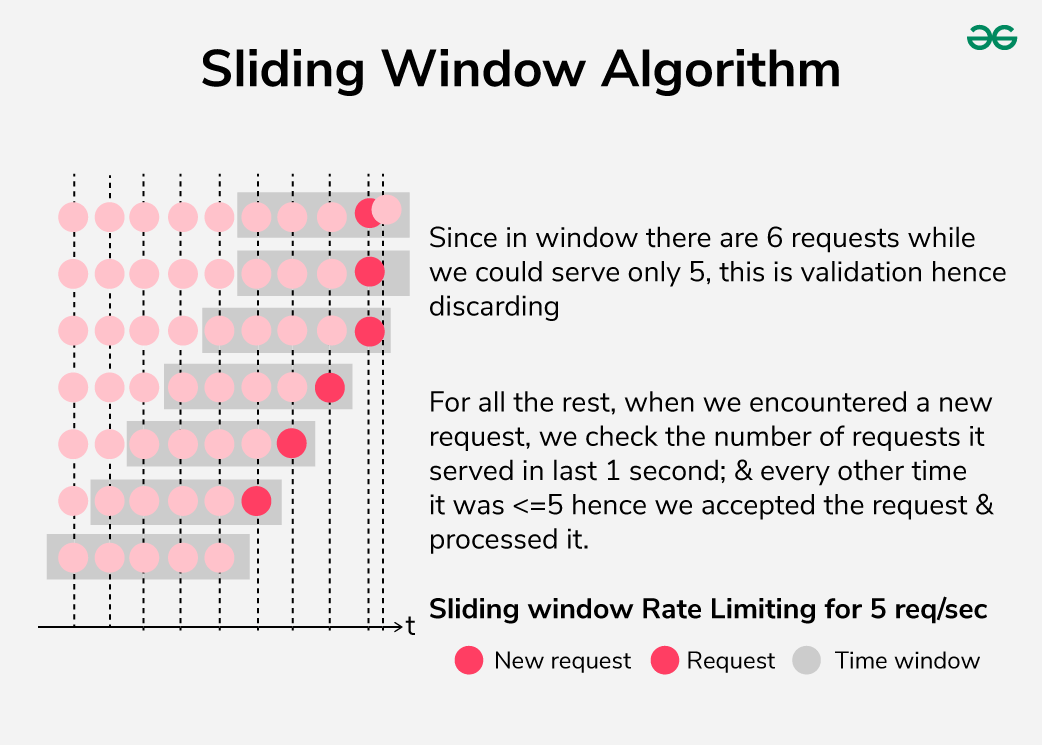
The window slides continuously with time. On each incoming request, Limitra computes a weighted count: the full count from the current slot plus a fraction of the previous slot proportional to how much of it still overlaps the window. This prevents the boundary burst problem of fixed windows.
When to use
Default choice for most APIs. Best when traffic fluctuates and you need accurate rate control without boundary bursts. Slightly more complex than fixed window but the accuracy gain is worth it at any scale.
from limitra import LimitraConfig, rate_limit

LimitraConfig(redis_url="redis://localhost:6379", project="my-service")

@rate_limit(requests=100, window=60, algorithm="sliding_window", key="user_id")
def api(user_id: str):
    return {"data": "..."}
Fixed window
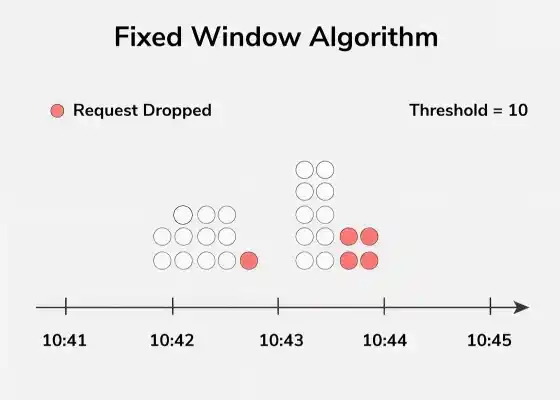
Time is divided into discrete slots of equal length. Each slot has its own counter, reset to zero at the start of the next slot.
Boundary burst
A client can send requests calls at the very end of one slot and requests again at the very start of the next — effectively 2× the limit in a short period.
When to use
Best for high-throughput systems where simplicity and speed matter more than boundary precision — e.g. background jobs, bulk processing, or coarse global limits. The boundary burst is rarely a problem in practice for internal services.
from limitra import LimitraConfig, rate_limit

LimitraConfig(redis_url="redis://localhost:6379", project="my-service")

@rate_limit(requests=1000, window=60, algorithm="fixed_window", key="user_id")
def high_throughput_api(user_id: str):
    return {"data": "..."}
Token bucket
A bucket holds up to requests tokens. Tokens are added continuously at requests / window per second, up to the bucket capacity. Each request consumes one token. When the bucket is empty, the request is rejected.
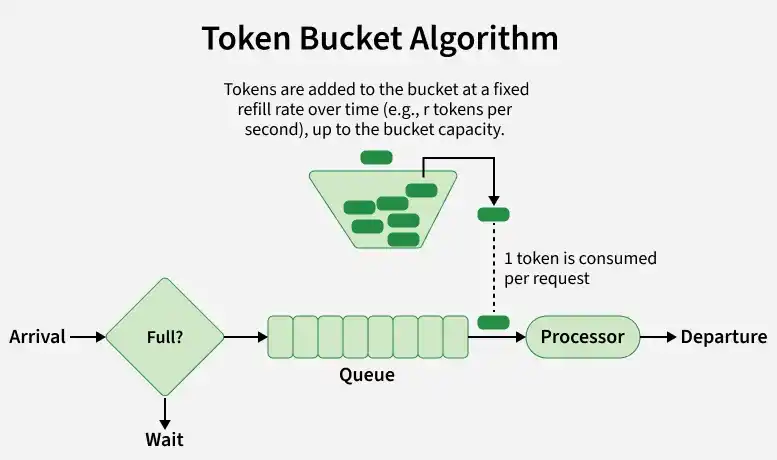
This allows short bursts (up to the full bucket capacity) while enforcing a long-term average rate equal to the fill rate.
When to use
Best when clients have bursty but otherwise well-behaved traffic — e.g. a mobile app that sends several requests in quick succession, then goes quiet. The burst is absorbed without rejection; sustained overuse is throttled.
from limitra import LimitraConfig, rate_limit

LimitraConfig(redis_url="redis://localhost:6379", project="my-service")

# Allows a burst of up to 20 requests, then throttles to 20/60 req/s
@rate_limit(requests=20, window=60, algorithm="token_bucket", key="user_id")
def bursty_api(user_id: str):
    return {"data": "..."}
Leaky bucket
Requests fill a bucket like water into a container. The bucket drains at a fixed rate of requests / window per second regardless of input. If the bucket is full, incoming requests are dropped.
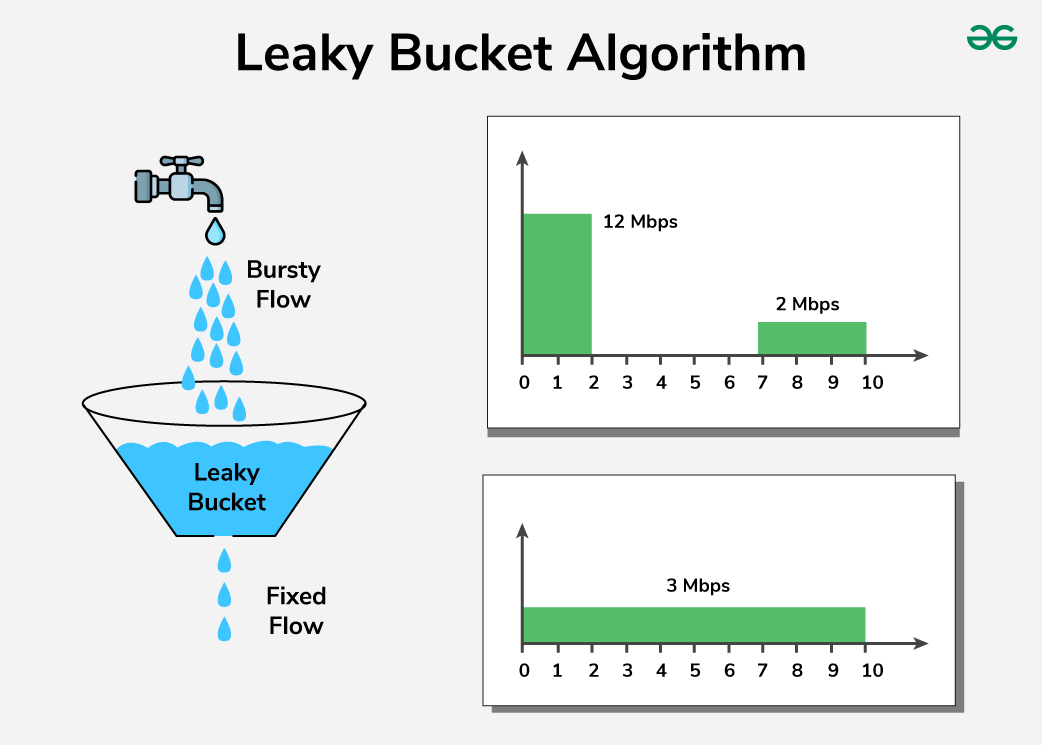
Unlike token bucket, the output rate is always constant — bursts are absorbed but never result in a faster drain.
When to use
Best for traffic shaping in front of a downstream service that cannot handle spikes — e.g. a payment processor, a third-party API with strict rate limits, or a database that performs poorly under bursty load. Guarantees a smooth, predictable request stream regardless of what comes in.
from limitra import LimitraConfig, rate_limit

LimitraConfig(redis_url="redis://localhost:6379", project="my-service")

# Smooths traffic to a constant 100/60 req/s regardless of bursts
@rate_limit(requests=100, window=60, algorithm="leaky_bucket", key="user_id")
def smooth_api(user_id: str):
    return {"data": "..."}
Direct use
Use the limiter classes directly without the decorator when you need lower-level control.
import redis
from limitra import SlidingWindowRateLimiter

client = redis.from_url("redis://localhost:6379")

limiter = SlidingWindowRateLimiter(
    capacity=100,
    fill_rate=1/60,
    scope="user",
    backend="redis",
    redis_client=client,
    project="my-svc",
)

user_id = "alice"

if limiter.allow_request(user_id):
    print("Request allowed")
else:
    status = limiter.get_status(user_id)
    wait = limiter.get_wait_time(user_id)
    print(f"Rate limited — {status['count']}/{status['capacity']} used, retry in {wait:.1f}s")
get_usage() returns a normalised dict across all algorithms:
Available classes: TokenBucketLimiter, LeakyBucketLimiter, FixedWindowRateLimiter, SlidingWindowRateLimiter.